
Bring your books to life.
From PDF to interactive book — in minutes.
Upload any document and layer on narration, video, hotspots, pop-outs, links, animation and scored quizzes. Publish a fast, beautiful book that works on every phone, tablet and desktop — and inside Wix.
Read it. Listen to it. Watch it. Explore it. Interact with it.
AI suggestion · 92%
Add a video hotspot on page 8
First page 0.9s · turn 82ms
Experience an iBook · no sign-up
Turn the pages yourself.
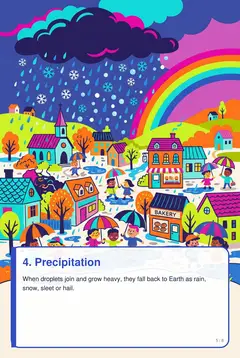
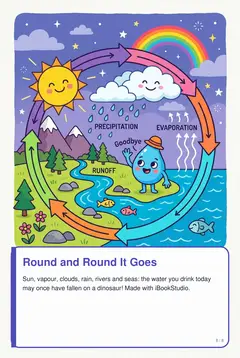
This is a real published iBookStudio book. Drag a page corner or use the arrows, open the pop-out buttons, tap hotspots, play the rain sounds and the NASA water-cycle video — then take the scored quiz on page 7.






How it works
Four steps from document to experience.
Upload
Drop a PDF. Pages and text are processed in seconds.
Enhance
Add layers yourself or accept AI suggestions.
Preview
Test the reader with real load-time readouts.
Publish
Get a link, embed code, Wix element and QR.
Eight interaction types
Everything you can place on a page.
Audio
Narration buttons that play on click or when the page opens.
Video
Inline or popup video. Poster first, streams on tap.
Image
Place images on the page and open them in a lightbox.
Hotspot
7 styles and 6 click actions, from popups to page jumps.
Animation
Fade, slide, zoom, bounce, pulse and rotate entrances.
Popup
Info icons or labelled buttons that open pop-out cards.
Link
Open any website or jump to another page.
Quiz
Multiple-choice & true/false with scoring and retry.
Every feature, explained
Built for authors. Loved by readers.
Drop in any PDF. Get an optimized book.
Our ingestion engine turns every page into lightweight WebP images in three sizes and pulls out a searchable text layer. Readers never download your original PDF.
- Textbooks, manuals, magazines, catalogues, children’s books
- Live progress while pages render
- Original PDF kept safe as the source
searchable text layer
An editor that feels like Canva, not a CMS.
Page thumbnails on the left, your page in the middle, properties on the right. Drag, resize and layer interactions directly on top of the page — the page itself is never modified.
- Drag & 4-corner resize
- Layers: hide, lock, duplicate, reorder, delete
- Autosave & entrance animations
Hotspots that invite a tap.
Seven hotspot styles — pulse, glow, circle, arrow, icon, invisible or your own image. Each one can play audio, open a video, show an image or popup, open a webpage or jump to a page.
- Pulse · Glow · Circle · Arrow · Icon · Invisible · Custom
- 6 click actions
- Screen-reader labels on every hotspot
Add sound to any page.
Add narration buttons that play on click or as soon as the page opens. Upload MP3s, loop ambience, and audio automatically stops when the reader turns the page.
- Narration buttons: click to play, play on page open, loop
- Upload MP3s or background ambience
- Audio stops automatically when the page is turned
The little lion walked into the forest.
Video that never slows the book down.
Videos show only a poster until the reader taps. Then they stream — inline on the page or in a popup. Works with uploaded MP4s and YouTube or Vimeo links.
- Poster-first, click-to-stream
- Inline or popup mode
- Muted autoplay, loop, start & end time
Click “Analyze this book”. Get a plan.
Claude reads every page and suggests where narration, video hotspots, ready-written quizzes and popups would help most — each with a confidence score. Nothing changes until you press Accept.
- Confidence score on every suggestion
- Accept adds the layer on the right page
- Reject keeps your book untouched
Audio narration
Video hotspot
Knowledge check
Quizzes that score, explain and let readers retry.
Add multiple-choice and true/false knowledge checks to any page. Readers get instant feedback on every answer, a final score against your pass mark, and a Retry button. Accept an AI quiz suggestion and the questions are written for you.
- Multiple choice, true/false, matching, fill-in-the-blank and drag & drop
- Points, pass mark, instant feedback and retry
- Results: attempts, average score, pass rate, per-question accuracy
- One-click quizzes from AI suggestions
Which step turns water vapour into clouds?
See exactly how readers use every book.
A per-book analytics view shows views, unique readers, average pages read, completion rate, the most-tapped hotspots and quiz results, all in one place.
- Views, unique readers & completion
- Page-by-page views chart
- Top hotspots, audio & video plays
- Quiz scores & pass rates
Views
2,512
Pages read
13.9
Hotspot taps
1,288
Classic Book or Fast Reader — your choice.
On desktop, Classic Book shows two facing pages with a realistic page curl you can drag from the corner. Fast Reader gives instant slide transitions for study sessions.
- Two-page spread with real page curl
- Single page on phones
- Readers can switch modes anytime
The book never feels like it’s loading.
Only the page you’re on and its neighbours are loaded. As you read, the loading window moves with you, and pages far away are cleared from memory — even on a 300-page book.
- Current page first, ±1 and ±2 preloaded
- Thumbnail shown instantly, HD fades in
- Media loads only when tapped
Everything readers expect, built in.
Thumbnails, full-text search across the book, zoom up to 300%, fullscreen, swipe on touch screens and arrow-key navigation on keyboards.
- Search finds every matching page
- Zoom & pan
- Swipe and keyboard friendly
Zoom 300%
Publish once. Share everywhere.
Each publish creates a fixed version (1.0, 1.1 …) and your live link always shows the newest one. Share a direct link, an iframe, a Wix custom element or a QR code — and every shared link shows your book’s own cover and title.
- Hosted URL + iframe embed
- Wix custom element <ibookstudio-book>
- Rich link previews with your cover on WhatsApp, X, Facebook & LinkedIn
- Downloadable QR code & version history
<iframe src=".../embed/abc123" allowfullscreen></iframe>Control who reads — and reach everyone who should.
Make a book public, unlisted or password protected. Slow connection? The reader automatically switches to lighter pages and a smaller preload window.
- Public · Unlisted · Password
- Automatic low-bandwidth mode
- Works on mobile, tablet & desktop
Low-bandwidth mode
800px pages · smaller preload window · click-to-load media
Install it. Read anywhere — even offline.
iBookStudio installs to any phone, tablet or desktop like a native app. Tap “Save offline” on a published book and the whole interactive experience — pages, hotspots, pop-outs, images and quizzes — keeps working with no internet at all.
- Add to home screen / install as an app
- “Save offline” caches a whole book for no-signal reading
- Opened books keep working if the connection drops
No signal? No problem.
Your saved books open instantly, anywhere.
Licensing
Start free for 7 days. Then choose your term.
Every new account gets a 7-day free trial with every feature. Licenses are assigned by our team for 1, 3, 6 or 12 months. Just send a request.
7 days
Automatically on sign-up
Accessible by design
Every interaction has alt text and screen-reader labels, readers can navigate with the keyboard, focus rings are visible, page text is searchable, and animations respect “reduce motion” settings.
Turn your next PDF into a book people interact with.
Upload, enhance with AI, publish to Wix — in minutes.